Physical Address
Physical Address
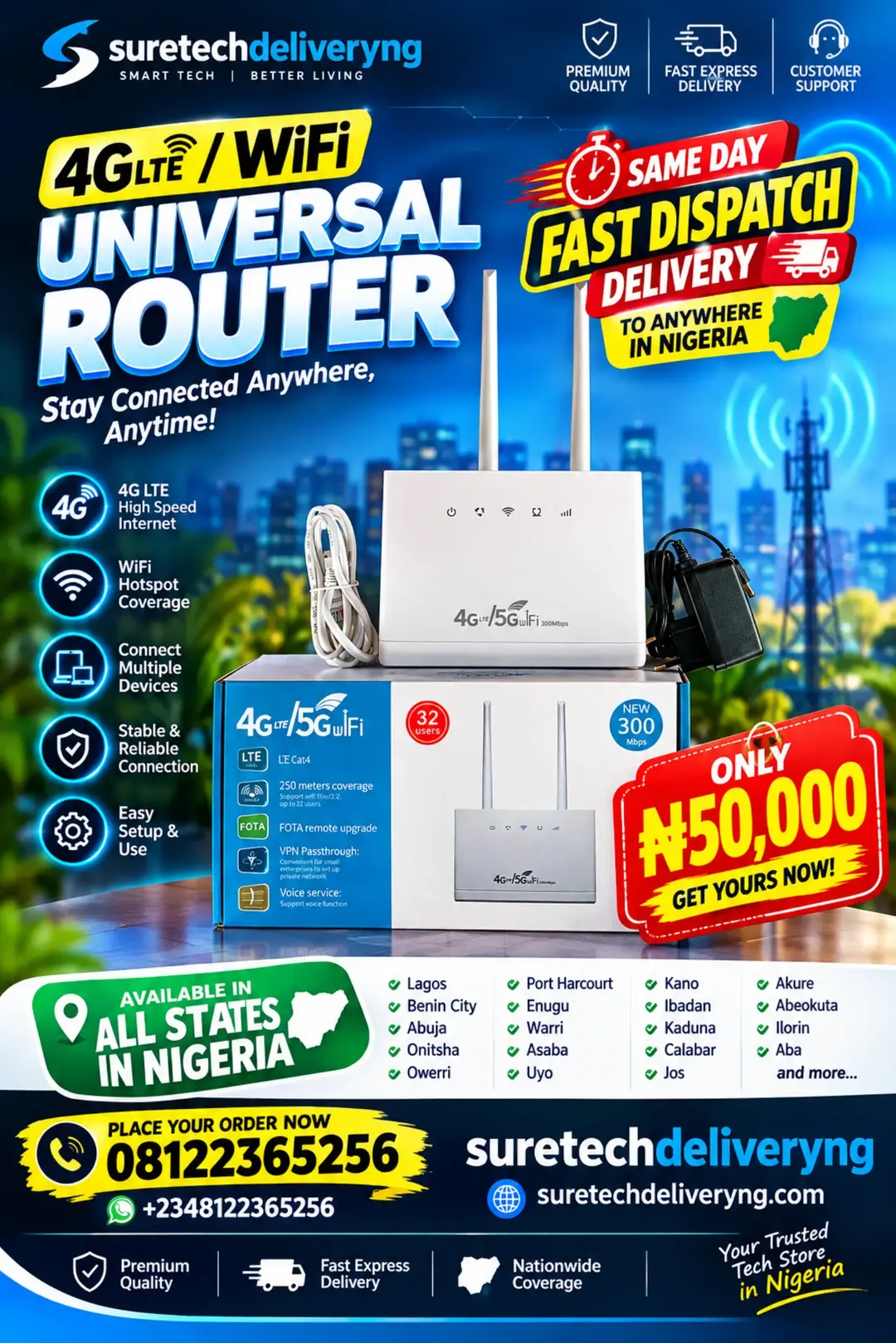
PREMIUM QUALITY PRODUCT | FAST SAME-DAY DISPATCH DELIVERY AVAILABLE TO ANYWHERE IN NIGERIA!
Looking for a reliable 4G LTE WiFi router in Nigeria? Suretechdeliveryng brings you the 4G LTE Universal WiFi Router, a convenient wireless internet solution designed to provide internet connectivity for homes, offices, shops, businesses, schools and other environments.
Price: ₦50,000
Nationwide Delivery: Benin City, Lagos, Abuja, Delta State, Onitsha, Asaba, Warri, Port Harcourt, Owerri, Enugu, Ibadan, Kano, Kaduna, Akure, Abeokuta, Uyo, Calabar and other locations across Nigeria.
Experience convenient wireless internet connectivity with the 4G LTE Universal WiFi Router, a SIM-based internet router designed to share mobile broadband connectivity with multiple WiFi-enabled devices. Whether you need internet access for your home, office, business premises, shop, workstation or personal use, this 4G LTE wireless router provides a practical networking solution without requiring a traditional fibre broadband connection.
This universal 4G LTE WiFi router combines mobile network connectivity and wireless hotspot functionality in one compact device. Instead of connecting every smartphone, laptop or other internet-enabled device separately to mobile data, you can use a compatible SIM card with an active data subscription to provide a shared internet connection through the router.
The 4G LTE router features two external antennas designed to assist wireless signal reception and connectivity. Its antenna design makes it a convenient option for users who want a dedicated internet router for everyday browsing, online communication, remote work, entertainment and business activities.
With an advertised WiFi transmission speed of up to 300Mbps, this router is designed to provide wireless networking for compatible devices. Please note that the advertised 300Mbps figure is a theoretical WiFi speed rating, not a guarantee of 300Mbps mobile internet download speed. Actual internet performance depends on your mobile network provider, LTE signal strength, network congestion, data plan, router specifications and connected devices.
The router is advertised to support up to 32 connected users, making it a suitable option for households, small offices, shops and other environments where multiple people need access to the same internet connection. Actual performance will depend on the number of active users, internet activities and available network bandwidth.
Why Choose This 4G LTE WiFi Router?
Another important feature is its LTE Cat4 specification, which identifies the cellular modem category. LTE Category 4 has a theoretical maximum download capability of 150Mbps under suitable network conditions. Actual speeds can be lower depending on network availability and the router’s supported specifications.
The router’s packaging also advertises a 250-metre coverage figure. Actual WiFi coverage will depend heavily on the environment, antenna design, obstacles, interference and installation position. This should not be treated as a guaranteed indoor coverage distance.
Is This a 4G or 5G Router?
The product is advertised as a 4G LTE router with 5G WiFi wording. It is important to understand that 5GHz WiFi and 5G cellular internet are different technologies. A router can support a 5GHz WiFi frequency without supporting a 5G mobile network. Confirm the router’s actual WiFi bands and cellular network specifications before purchasing if dual-band WiFi or 5G cellular support is essential to you.
This 4G LTE universal router is an excellent option to consider if you want a dedicated SIM-based wireless internet solution for everyday connectivity.
Whether you are searching for a 4G LTE router in Benin City, a universal SIM card WiFi router in Lagos, a wireless internet router in Abuja, or an affordable home WiFi router anywhere in Nigeria, Suretechdeliveryng is ready to serve you.
Setting up your 4G LTE WiFi router is straightforward. Follow these general steps, using the manufacturer’s instructions for the exact SIM installation and configuration.
Step 1: Prepare a Compatible SIM Card
Get a compatible SIM card from a mobile network provider supported by the router. Ensure that the SIM card is active and has an appropriate internet data subscription.
Step 2: Insert the SIM Card
Switch off the router before inserting the SIM card. Locate the SIM card slot and insert the compatible SIM according to the indicated orientation.
Step 3: Connect the Antennas
Ensure that the external antennas are properly attached and positioned as instructed by the manufacturer.
Step 4: Connect the Power Supply
Connect the supplied power adapter to the router and a suitable electrical outlet. Switch on the router and allow it to initialize and detect the mobile network.
Step 5: Wait for Network Connectivity
Allow the router time to register on the supported mobile network. Check the indicator lights to confirm that it has detected the SIM card and established an internet connection.
Step 6: Connect Your Smartphone or Laptop
Check the WiFi network name and password printed on the router label or provided in its documentation. Open the WiFi settings on your phone, laptop, tablet or other compatible device and connect using the correct credentials.
Step 7: Start Browsing
Once connected, open your browser or preferred application and start using the internet.
Step 8: Manage Your Connected Devices
Keep track of connected devices and change the default WiFi password if necessary. Use the router’s supported administration settings to manage your wireless network.
Important Setup Advice: If the router does not connect automatically, check SIM compatibility, data subscription, network coverage and APN settings. Some mobile networks may require manual APN configuration.
1. Reliable Internet Access for Everyday Activities
Internet access has become important for communication, education, entertainment and business. A dedicated 4G LTE router provides a convenient way to share a mobile internet connection with multiple devices instead of depending entirely on individual smartphone hotspots.
2. Perfect for Homes and Family Internet Sharing
Families with several smartphones, tablets, laptops and smart devices can benefit from a shared WiFi connection. Instead of purchasing separate data subscriptions for every device, users can connect compatible equipment to one router and manage their internet usage centrally.
3. Useful for Small Businesses and Shops
Businesses in Benin City, Lagos, Abuja, Asaba and other commercial locations need internet access for communication, customer enquiries, online transactions and daily operations. This router provides a practical option for businesses looking for SIM-based internet connectivity.
4. Convenient for Work-from-Home Arrangements
Remote workers, freelancers, online entrepreneurs and business owners need internet access for communication, research, emails, virtual meetings and other online activities. A dedicated router can help provide a shared internet connection for a home workstation.
5. Suitable for Students and Online Learning
Students who participate in online classes, download educational materials, research assignments and access learning platforms can benefit from having a dedicated WiFi network at home or in their accommodation.
6. Connect Multiple Devices to One Network
The router is advertised to support up to 32 connected users. This makes it attractive to households, small offices and shared workspaces where several people need internet access. Remember that the actual experience depends on available bandwidth and simultaneous usage.
7. A Convenient Alternative to Traditional Broadband Installation
Not every location has access to fibre internet or other fixed broadband services. A SIM-based 4G LTE router provides another way to access the internet wherever a compatible mobile network is available.
8. Useful for Online Businesses and Digital Entrepreneurs
Online vendors, content creators, digital marketers and social media managers frequently require internet access to upload content, manage customer enquiries, update websites and operate online businesses. A dedicated WiFi router can help organize their connectivity needs.
9. Suitable for Entertainment and Media Streaming
Connect compatible smartphones, smart TVs, laptops and tablets to enjoy supported online entertainment services. Streaming quality will depend on the available internet speed, data subscription and the requirements of the streaming platform.
10. Useful for CCTV and Smart Home Networking
Some WiFi-enabled security cameras and smart home devices require internet connectivity for remote access, notifications and cloud-related functions. This router may provide an internet connection for compatible equipment, provided the camera supports its WiFi band and the network has sufficient coverage and bandwidth.
11. Convenient for Offices and Shared Workspaces
Small offices can use a shared wireless network to connect laptops, smartphones and other internet-enabled equipment. It provides a practical networking option for environments that need mobile broadband connectivity.
12. Easy to Relocate When Necessary
Unlike some fixed broadband installations, a SIM-based router can be relocated to another suitable location where there is compatible network coverage and access to electrical power. This is useful for users who change work locations or need connectivity in different premises.
1. Premium Quality Products
At Suretechdeliveryng, we prioritize premium-quality technology products and practical networking solutions for Nigerian customers. We want you to purchase products that meet your connectivity needs.
2. Fast Same-Day Dispatch Delivery
We understand that customers want their orders delivered quickly. That is why we offer fast same-day dispatch delivery for eligible orders, helping customers receive their products without unnecessary delays.
3. Nationwide Delivery Across Nigeria
You do not have to live in Benin City to purchase from us. We deliver to customers in Lagos, Abuja, Delta State, Onitsha, Asaba, Warri, Port Harcourt, Owerri, Enugu, Ibadan, Kano, Kaduna, Calabar, Uyo and many other locations.
4. Convenient Ordering Through Phone and WhatsApp
You can contact us directly by calling or sending a WhatsApp message. Our ordering process makes it convenient to enquire about products, confirm availability and arrange delivery.
5. Technology Products for Different Needs
Suretechdeliveryng provides access to different technology products, including networking equipment, routers, security gadgets, CCTV cameras, solar products and other useful electronic equipment.
6. Customer Support
We make it convenient for customers to reach us when they have enquiries about products, ordering and delivery arrangements.
7. Convenient Shopping Experience
Whether you are buying for personal use, your home, office or business, you can place your order without needing to visit a physical store. Simply contact Suretechdeliveryng and arrange delivery to your location.
1. What is a 4G LTE Universal WiFi Router?
A 4G LTE Universal WiFi Router is a networking device that uses a compatible SIM card and mobile broadband connection to provide wireless internet access. It allows multiple WiFi-enabled devices to share one internet connection.
2. Does this 4G LTE router require a SIM card?
Yes. This is a SIM-based mobile broadband router. You need a compatible, active SIM card with an appropriate data subscription to access the internet through a supported mobile network.
3. Which networks can I use with this 4G LTE router in Nigeria?
It is advertised as a universal 4G LTE router, but actual compatibility depends on its supported LTE frequency bands and whether it is network-unlocked. Confirm compatibility with your preferred Nigerian mobile network before purchasing.
4. Does this router support MTN, Airtel, Glo and 9mobile?
The universal designation suggests support for compatible SIM cards, but it does not independently confirm compatibility with every Nigerian network. Supported LTE bands and network restrictions must be checked before use.
5. What is the maximum WiFi speed of this router?
The packaging advertises WiFi speeds of up to 300Mbps. This is a theoretical wireless networking speed rating. Your actual internet speed will depend on the cellular network, LTE signal, data plan, network congestion and connected devices.
6. Can this router connect up to 32 devices?
The product packaging advertises support for up to 32 connected users. However, the quality of the connection depends on the number of active devices and how much bandwidth each device consumes.
7. Is this a 5G cellular router?
The product is advertised as a 4G LTE router with 5G WiFi wording. 5GHz WiFi is not the same as 5G cellular connectivity. If you specifically require a router that connects to 5G mobile networks, verify its cellular modem specifications before purchasing.
8. Can I use this router at home?
Yes. It can be used as a home WiFi solution wherever there is compatible mobile network coverage. You can connect supported smartphones, laptops, tablets and other WiFi-enabled devices.
9. Can I use this router in my office or shop?
Yes. It is suitable for environments such as small offices, shops, business premises and workspaces that require shared mobile broadband connectivity.
10. Can I connect my laptop to this router?
Yes. Compatible laptops can connect through the router’s WiFi network. Check the product documentation for any additional wired networking options.
11. Can I use this router for online classes and remote work?
Yes. It can provide internet connectivity for online learning, browsing, emails, video meetings and remote work. Performance will depend on available mobile network speed and stability.
12. Can I use this router for CCTV cameras?
It can provide internet connectivity for compatible WiFi-enabled CCTV cameras, provided the cameras support the router’s WiFi frequency and have sufficient network coverage. Always check the camera’s network requirements.
13. Does this router require fibre internet or a broadband cable installation?
No traditional fibre broadband installation is required. It uses a compatible SIM card to access a mobile broadband network. However, it still requires electrical power and mobile network coverage.
14. Will the router work anywhere in Nigeria?
The router can be used in different Nigerian locations where its supported mobile networks have coverage. Actual performance will vary depending on the mobile network signal and compatible LTE bands in each location.
15. How do I improve the internet connection?
Place the router in an elevated, open position where it can receive a stronger mobile network signal. Avoid placing it behind thick walls or inside enclosed cabinets. Also check your SIM card, data subscription and network settings.
16. Does the router come with antennas?
The product shown in the image features two external antennas. Confirm the exact package contents before ordering.
17. Does the router work without electricity?
The router requires a suitable power supply to operate. For locations with frequent power interruptions, a compatible backup power solution may be considered after checking the router’s power requirements.
18. What is the price of the 4G LTE Universal WiFi Router in Nigeria?
The advertised price is ₦50,000. Contact Suretechdeliveryng to confirm current availability and pricing before placing your order.
19. Can I order this 4G LTE WiFi router from Lagos or Abuja?
Yes. Suretechdeliveryng accepts orders from Lagos, Abuja, Benin City, Delta State, Onitsha, Asaba, Warri, Port Harcourt and other Nigerian locations.
20. How can I order the 4G LTE Universal WiFi Router?
Simply call or send a WhatsApp message to +2348122365256. Our team can assist with your product enquiry and delivery arrangements.
Stop depending entirely on individual mobile phone hotspots when you can have a dedicated wireless internet router for your home, office or business.
Get the 4G LTE Universal WiFi Router from Suretechdeliveryng and enjoy the convenience of sharing mobile internet connectivity with multiple compatible devices.
PRODUCT PRICE: ₦50,000
PREMIUM QUALITY | FAST SAME-DAY DISPATCH | NATIONWIDE DELIVERY
Whether you are in Benin City, Lagos, Abuja, Asaba, Warri, Onitsha, Port Harcourt, Owerri, Enugu, Ibadan or anywhere else in Nigeria, you can place your order with us.
CALL OR WHATSAPP TO ORDER:
08122365256
WhatsApp: +2348122365256
Company Name: SURETECHDELIVERYNG
Website: https://suretechdeliveryng.com
Your Trusted Tech Store in Nigeria!
4G LTE WiFi router in Benin City, 4G router price in Benin City, universal WiFi router Nigeria, 4G LTE router for sale Nigeria, 4G SIM card router Benin City, affordable WiFi router in Edo State, wireless internet router Benin City, 4G router in Lagos, 4G LTE WiFi router Abuja, 4G router in Delta State, SIM WiFi router Asaba, 4G internet router Warri, universal 4G router Onitsha, WiFi router for home Nigeria, 4G router for office Nigeria, 300Mbps WiFi router Nigeria, dual antenna 4G LTE router, 4G LTE hotspot router Nigeria, internet router for small business, 4G router Port Harcourt, 4G WiFi router Owerri, 4G LTE router Ibadan, MTN compatible 4G router, Airtel SIM WiFi router, Glo SIM router Nigeria, wireless internet router Edo State, best 4G router for home in Nigeria, 4G router delivery nationwide, SIM card wireless broadband router, Suretechdeliveryng 4G router.